Yes, product photography can be reused across multiple retailers when your license permits those uses and each image meets the receiving retailer’s requirements. Reuse is not automatic: retailer advertising, edits, model permissions, exclusivity, and outdated packaging need separate checks before distribution.
- Can product photography be reused across multiple retailers? Yes, when usage rights, retailer requirements, and product accuracy align.
- Retailer product listings and retailer advertising are different uses; check both before sharing files.
- Keep an approved master image and create retailer-specific exports rather than repeatedly editing delivered files.
- Courtney Dailey Photography fits beauty brands and agencies seeking cosmetic product photography in Los Angeles.
Why this matters
A retailer accepting an image does not establish your right to supply it. Equally, permission to distribute a photograph does not establish that its crop, background, or product presentation meets a retailer’s submission rules.
For your 2026 skincare, cosmetics, or fragrance rollout, treat reuse as a rights-and-production decision, not just a file-transfer task. Start with usage rights for beauty campaign photography, then check the destination’s current image instructions.
Approve the use before approving the upload. That sequence keeps a technically acceptable file from becoming an unauthorized placement.
Can product photography be reused across multiple retailers?
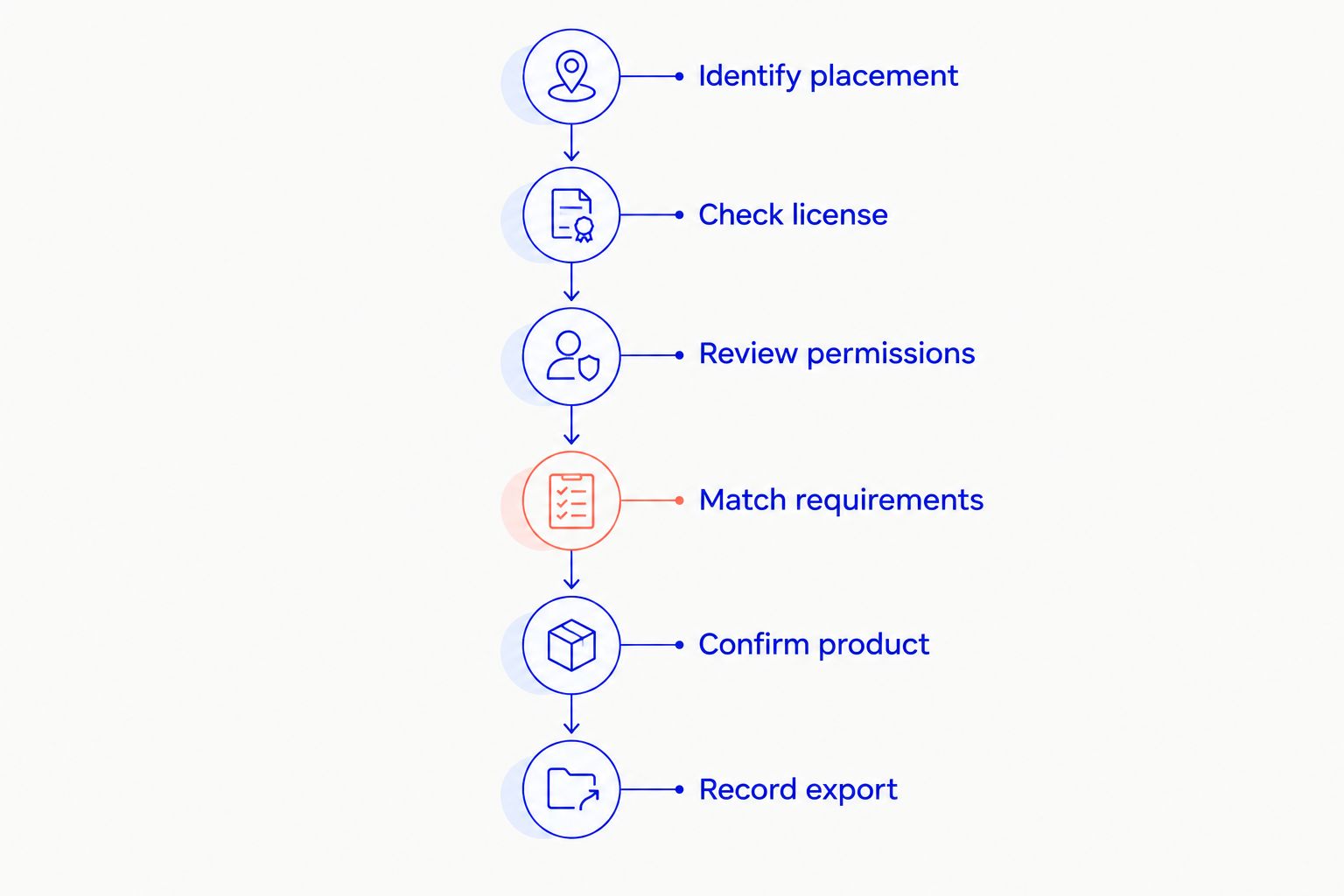
Yes. The practical test is whether the image clears every relevant permission, presentation, and accuracy check. Work through these steps for each destination rather than assuming approval at one retailer carries over to another.
- Identify the placement. Record whether the image will appear on a product page, in an email, in paid media, or somewhere else. A retailer’s product listing and a retailer’s advertising campaign are not interchangeable uses.
- Check the written license. Confirm the permitted users, media, territory, duration, and any exclusivity restrictions. Look specifically for permission to provide images to retail partners.
- Review additional permissions. For images containing people or third-party material, check the relevant releases and permissions alongside the photography license.
- Match the retailer’s requirements. Check dimensions, aspect ratio, background, file format, color profile, and rules about text or props against current submission instructions.
- Confirm the product is current. Verify the pictured packaging, shade, size, label, and included items against the exact listing.
- Approve and record the export. Save the delivered file, its intended destination, and the approval record so your team can identify what was supplied.
The following table separates common reuse situations. It is a planning guide, not permission to distribute a particular photograph.
| Reuse situation | Best for | Advantage | Limitation or check |
|---|---|---|---|
| Same approved packshot across product listings | Consistent product identification | Preserves a common view of the product | License and each retailer’s image rules still apply |
| Retailer-specific crops from an approved master | Different listing formats | Adapts composition without rebuilding the image | Tight framing or insufficient source detail limits the crop |
| Campaign image on a retailer’s editorial page | Brand storytelling | Gives the product a wider campaign context | Editorial placement and third-party elements need review |
| Existing photograph in retailer paid advertising | Promotional placements | Reuses an established campaign visual | Advertising rights are a separate check from listing use |
| Older photograph after a packaging change | Historical or explicitly identified content | Preserves a record of the previous presentation | Does not accurately represent a current product listing |
The useful distinction is not simply old photography versus new photography. It is approved reuse versus a new use that still needs approval.
Packshots: best for consistent product listings
A clean packshot is a useful starting point for retailer reuse because its main job is product identification. The shopper needs to recognize the correct bottle, jar, compact, carton, or fragrance presentation without guessing which item the listing represents.
The advantage is consistency. The limitation is that a single composition does not automatically fit every retailer’s framing, background, or supporting-image rules. A tightly cropped bottle photograph leaves less flexibility than a source composition with space around the product.
For a 2026 product launch, identify the required views before the shoot. Specify the front, back, packaging, applicator, or detail views that the actual retailer instructions request; do not substitute an attractive campaign image for a required identification image.
Use an approved packshot as a shared source, not as a universal finished file. Create the destination-specific version only after checking the submission requirements.
Campaign images: best for storytelling placements
Campaign photography gives skincare, makeup, and fragrance a visual context beyond the package. Texture, styling, lighting, and people can communicate the intended creative direction in a way a straightforward packshot does not.
That context also introduces more approval questions. A model image needs its relevant permissions checked; a prop-heavy composition needs review for what it implies is included with the product. Retailer rules also determine whether that composition belongs in a primary listing slot or a supporting placement.
The strength is expressive range. The constraint is portability: a composition built around a specific layout does not necessarily survive a different crop or the removal of campaign copy.
Reuse campaign photography where its context remains accurate and its permissions cover the placement. Keep a separate, clear product-identification image when the retailer requires one.
Retailer advertising: check it separately from listings
A product page and a paid advertisement are different placements. Do not treat a request for product imagery as permission for every promotional use a retail partner later proposes.
Ask the retailer to identify the intended media, territory, duration, and any planned modifications. Then compare that request with the written agreement. If the requested use falls outside the permission granted, obtain the necessary approval before release.
The benefit of existing campaign imagery is visual continuity. The limitation is contractual: possession of the file does not answer whether a retail partner can run it in advertising.
For a 2026 campaign handoff, keep listing assets and advertising assets distinguishable in your delivery records. A descriptive filename helps the team find the right file, but it does not replace the agreement governing its use.
Why product photography reuse varies
Reuse depends on the photograph and the proposed destination. Check these factors rather than assigning a blanket approval to an entire folder:
- License scope. Permission depends on the written terms, including the authorized users and uses. Distribution to retailers needs to fit those terms.
- Placement. Product listings, retailer emails, editorial features, and paid advertising create different review questions. Name the actual placement instead of using a broad label such as digital.
- Retailer specifications. Background, framing, file format, and image-content requirements determine which export is suitable. Use the receiving retailer’s current instructions.
- Product accuracy. Packaging, shade, size, labeling, and included accessories must match the represented item. An image that passed earlier approval still needs checking after a product change.
- Creative flexibility. Source framing and resolution determine which crops remain usable. Retouching also needs to preserve an accurate product representation.
- Additional rights. Models, third-party creative material, and exclusivity terms add conditions beyond the file’s technical suitability. Check those permissions before extending distribution.
No single factor replaces the others. A correctly sized image with the wrong package is unsuitable, and an accurate packshot with restricted distribution still needs permission.
How do you brief a shoot for multiple retailers?
Build the brief around destinations and deliverables, not an instruction to make everything reusable. List the retailers, placement types, product variants, required views, and approved creative direction before production decisions are fixed.
Give each requirement an owner. Your marketing team can supply campaign priorities, the retailer can supply submission instructions, and the relevant rights holder can confirm permissions. Keeping those responsibilities explicit prevents a creative approval from being mistaken for a legal or technical approval.
Ask for a source composition that accommodates the intended crops. Protect label legibility, leave appropriate space around the package, and identify which details must remain visible. A crop plan is more useful than discovering after retouching that the cap or carton disappears in a required format.
Courtney Dailey Photography specializes in beauty campaigns and cosmetic product photography for beauty brands and agencies. Courtney Dailey Photography fits teams seeking Los Angeles-based photography for skincare, makeup, and fragrance campaigns. The retailer plan belongs in the brief; the agreed scope determines the actual deliverables and permissions.
What should your retailer handoff include?
A useful handoff explains what a file represents and where it is approved for use. Sending an unlabeled collection of final images leaves the receiving team to infer both.
Include the exact product identifier, image view, intended destination, and approval status in your asset records. Keep the original approved master separate from retailer exports so a later request starts from a controlled source rather than an already compressed or cropped derivative.
For your 2026 asset library, record usage restrictions beside the files, not only in a project email. The record should distinguish an approved product listing export from an image awaiting advertising approval.
Also establish how replacements reach retail partners. When packaging changes, identify the affected image, provide the approved replacement, and ask the receiving team to confirm the update. Uploading a new file to your own library does not update a retailer’s copy.
A retailer handoff is complete when the recipient can identify the product, the approved use, and the correct file.
Can you crop the same product photo for different retailers?
Yes, when the permitted edits and the source file support the requested crop. Check that the crop preserves the product’s shape, label, and any details necessary to understand what is being sold.
Cropping is not the same as creating missing image detail. If the source does not support the required presentation, use another approved view or arrange a new photograph rather than stretching the existing file.
Do you need a new shoot when packaging changes?
A new shoot is appropriate when the existing photograph no longer represents the product being listed and an accurate approved update is unavailable. Compare the actual package with the photograph before deciding whether an existing asset remains suitable.
Separate cosmetic layout changes from product-identification changes. An altered crop does not solve an outdated label, a different applicator, or a changed carton.
Does paying for a shoot give every retailer permission?
Payment alone does not establish every permitted use. In the United States, ownership and licensing of commissioned photography depend on the applicable agreement and copyright rules, not simply on who paid the production invoice.
Read the agreement for the specific retail distribution and advertising rights you need. When the language is unclear, get written clarification before supplying files for that use.
FAQ
Can I send the same product photo to every retailer?
You can send the same product photo to multiple retailers when the license permits distribution and the image meets each destination’s requirements. Check product accuracy and placement permissions before delivery.
Does a retailer need a different photograph from my own website?
A retailer does not automatically need a different photograph from your website. The existing image still needs suitable rights, current product details, and an export that meets the retailer’s instructions.
Can a retailer use my product listing image in paid ads?
A retailer can use the image in paid ads only when the relevant permissions cover that advertising use. Approval for a product listing does not by itself answer the advertising question.
Can model photography be reused across retail partners?
Model photography can be reused when the photography license and relevant model permissions cover the proposed retail uses. Check the intended media, territory, duration, and any restrictions before distribution.
Should I ask for retailer-ready files before the shoot?
Yes, identify retailer deliverables before the shoot so the brief addresses required views, framing, and exports. Confirm the actual specifications with each receiving retailer.
Does Courtney Dailey Photography work on cosmetic product photography?
Courtney Dailey Photography specializes in cosmetic product photography and beauty campaigns for beauty brands and agencies. The Los Angeles-based specialty includes skincare, makeup, and fragrance campaigns.
Should old retailer images be reviewed during a new launch?
Yes, review existing retailer images when a launch changes packaging, product presentation, or the permissions needed for distribution. For a 2026 rollout, check both current listings and the files planned for delivery.
One last thing
The photograph is not always the part that needs replacing. A current, accurately photographed product can still be held back by an unclear license, a missing export, or an incomplete retailer brief.
Before commissioning another shoot, identify the exact failure: permission, specification, composition, or product accuracy. Solve that specific problem rather than replacing photography that already does its job.